
DevelopmentAI
Summary: For most small business websites, WebMCP calls for a form cleanup and a few HTML attributes. No rebuild required. The markup that helps a screen reader understand your quote form is the same markup that helps an agent fill it in.
What Is WebMCP? How to Make Your Website Agent-Ready
WebMCP is a proposed web standard that lets a website hand AI agents a list of actions it supports, like “search products” or “request a quote,” with the exact inputs each one needs. Agents call those actions directly instead of guessing at buttons. Chrome is testing it now, and Shopify switched it on for every Liquid store in August.
Before 1983, a Roland synth and a Sequential synth had no shared language. If you wanted one to follow the other, you recorded it and played the part again by hand. MIDI changed that. Note on, note off, how hard the key was hit: one cable, and the second instrument knew exactly what to play.
WebMCP is that cable for websites and AI agents. Today, an agent booking a table or requesting a quote on your site does the microphone version. It takes screenshots, reads the page code, guesses which field wants a phone number and hopes the blue button is the submit button. WebMCP gives your site a port the agent can plug into instead.
What is WebMCP?
WebMCP (Web Model Context Protocol) is a browser standard that lets a page declare what an agent can do on it. Engineers from Google and Microsoft are writing it through the W3C Web Machine Learning Community Group. Google’s Chrome team opened an early preview on February 10, 2026.
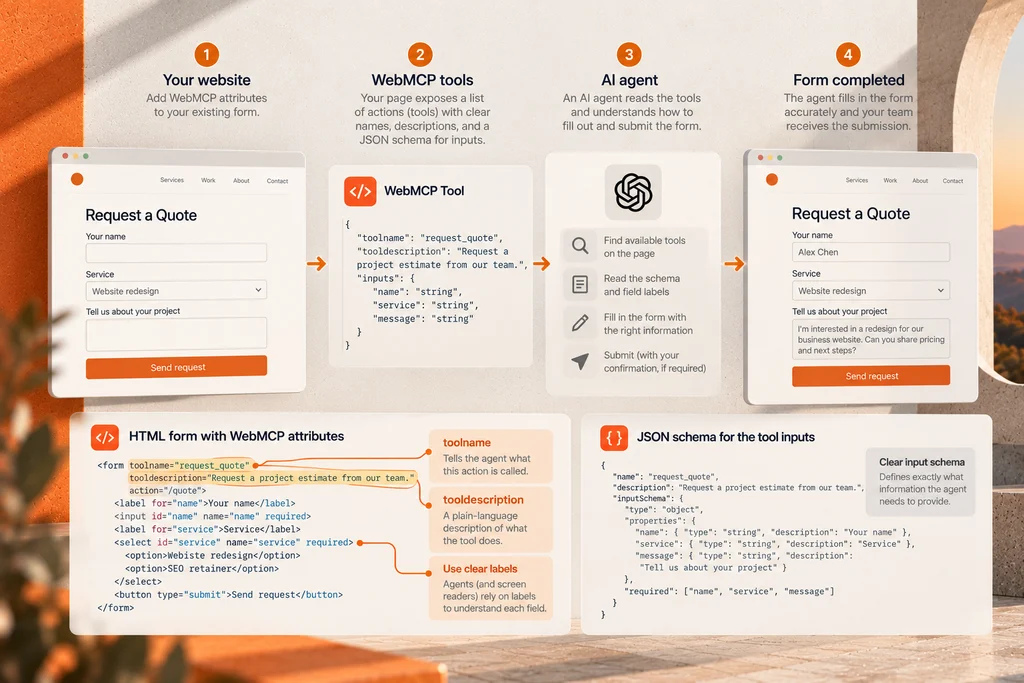
A site registers “tools.” Each tool has a name, a plain-language description and a JSON Schema that lists its inputs. An agent visiting the page reads that list and calls the tool it needs. People still see the same site. Chrome’s documentation calls this a progressive enhancement, so browsers without support simply ignore it.
The name borrows from MCP, the Model Context Protocol, which connects AI apps to back-end systems through a server. WebMCP runs inside the browser tab and uses the visitor’s live session. Nothing new runs on your server.
How does WebMCP work on a website?
There are two ways to add it. The declarative API turns an existing HTML form into a tool with two attributes on the <form> tag: toolname and tooldescription. The imperative API uses JavaScript, through document.modelContext.registerTool(), for actions that aren’t forms, like product filters, a cart or a date picker.
Here’s a quote request form with the declarative attributes added:
<form toolname="request_quote"
      tooldescription="Request a project estimate from our team."
      action="/quote">
  <label for="name">Your name</label>
  <input id="name" name="name" required>
  <label for="service">Service</label>
  <select id="service" name="service" required>
    <option>Website redesign</option>
    <option>SEO retainer</option>
  </select>
  <button type="submit">Send request</button>
</form>
Look at what does the heavy lifting there. It’s the labels. Chrome builds each input’s description from its <label>, and falls back to aria-description when there isn’t one. Swap labels for placeholder text and the form gets harder to use. That’s true for a person on a screen reader and for an agent.
By default, the agent fills the form and the person clicks submit. A toolautosubmit attribute lets the agent submit on its own, which makes sense for a site search and not much else. While an agent works, Chrome outlines the form so the visitor can see what’s happening.
Who supports WebMCP right now?
Support grew fast in late summer. Chrome moved WebMCP into a public origin trial starting with Chrome 149. Sites can now run it for real visitors by registering a trial token.
| Date (2026) | Who | What happened |
|---|---|---|
| Aug 25 | OpenAI | The ChatGPT desktop app’s browser added WebMCP as “site tools,” for GPT-5.6 Sol and Terra (not Enterprise or Edu workspaces) |
| Aug 21 | Shopify | WebMCP tools went live on every Liquid storefront: catalog search, cart and checkout, with nothing to install |
| Aug 6 | Cloudflare | Developer preview: one dashboard switch adds WebMCP tools to a site with no code changes |
| May 19 | Chrome 149 origin trial announced at Google I/O, with Gemini in Chrome support to follow | |
| Feb 10 | Early preview behind a Chrome flag |
Firefox and Safari haven’t said anything public yet. Microsoft co-wrote the spec, but Edge support isn’t confirmed in its release notes.
So far the supply has outrun the demand. Chrome’s docs list discoverability as a limitation: an agent has to visit your site before it knows your tools exist. WebMCP has no effect on how agents find you. Its job starts once an agent lands on your page.
Does WebMCP help SEO or AI search visibility?
Not directly. Google hasn’t announced any ranking connection, and WebMCP tools are invisible until an agent is already on the page. Getting cited by ChatGPT or showing up in an AI Overview still depends on content, entity signals and structured data.
WebMCP sits one step later in the funnel. Say an AI assistant recommends your business and the user tells it to book a consultation. Can the agent finish the job, or does it stall on your form? That’s a conversion question, and conversion is where web development earns its keep.
What makes a website agent-ready?
An agent-ready website is one an agent can operate without guessing. Most of that work is plain, well-built HTML, which is good news, because it also helps every human visitor.
Forms built on real HTML
Every field needs a <label>, the right input type (email, tel, date) and a clear required state. Dropdown options should say what they mean. This is accessibility work you should be doing anyway, and WebMCP rewards it twice.
Forms that live on your own domain
Many sites embed scheduling or quote widgets from a third party inside an iframe. WebMCP’s permissions policy blocks tool registration in cross-origin iframes unless the embed allows it, and you don’t control that vendor’s markup. If your booking flow matters, it should run on your own pages.
Tool names and descriptions written like good copy
A model reads your tooldescription cold. “Submit” tells it nothing. “Request a project estimate for a website or SEO engagement” tells it when to use the tool. It’s the same discipline as writing a meta description, aimed at a different reader.
A human confirmation step for anything that matters
Keep the default for bookings, deposits and purchases: the agent fills, the person confirms. ChatGPT’s site tools already ask before purchases, account changes or sharing personal information, and your site should hold the same line.
When we build a site, the forms get the same attention as the homepage, because that’s where leads arrive. You can see how that plays out across recent builds in our portfolio.
Should your business add WebMCP now?
It depends on what your site runs on and what visitors do there.
| Your site | What WebMCP means today | What to do |
|---|---|---|
| Shopify store on a Liquid theme | Already on. Agents can search, add to cart and reach checkout | Clean up product titles, variants and policy pages, since agents read them |
| Shopify store on production Hydrogen | Not on yet (only the Hydrogen developer preview has it) | Wait for Shopify, or plan it into your next release |
| Site behind Cloudflare | One switch, but the preview’s packs cover image credentials and your own MCP server | Fine to test; it won’t expose your forms by itself |
| WordPress or custom site with a booking or quote form | Nothing yet | Add toolname and tooldescription to that form at your next update |
| Brochure site with a phone number and email link | Little to expose | Spend the effort on content, schema and a real contact form |
For a service business, the declarative attributes are a small, low-risk change. Browsers without support ignore them. The bigger win is the form audit that should come first.
In audio, you make an edit at the zero crossing, where the waveform passes through silence, so the cut doesn’t click. Agent traffic is still small. Fixing your forms now is the clean edit, done before the volume comes up.
FAQ
Is WebMCP the same as MCP?
No. MCP connects AI apps to back-end systems through a server, while WebMCP runs inside the browser tab. A WebMCP tool lives in your page’s own code and uses the visitor’s signed-in session. You don’t deploy anything new on your server to support it.
Does my small business website need WebMCP?
Most small business sites don’t need WebMCP today, but they do need forms an agent can read. Labeled fields, correct input types and a booking flow on your own domain come first. Once those are solid, adding toolname and tooldescription to a key form takes minutes.
Does WebMCP work with ChatGPT?
Yes. Since August 25, 2026, the browser inside the ChatGPT desktop app supports WebMCP under the name “site tools.” OpenAI lists GPT-5.6 Sol and Terra as supported, and site tools aren’t available in Enterprise or Edu workspaces. In Chrome, Gemini is the agent expected to call these tools.
Is WebMCP safe for my website?
WebMCP keeps the person in control by default: the agent fills a visible form, and the person clicks submit. Chrome outlines the form while an agent works on it. Chrome’s security guidance also warns about tool descriptions being used to mislead agents, so only expose actions you’d be comfortable letting a stranger’s assistant attempt.
How do I test WebMCP on my site?
You can test WebMCP locally by turning on the chrome://flags/#enable-webmcp-testing flag in Chrome. Google’s Model Context Tool Inspector extension then shows the tools your page registers and lets you call them. To run WebMCP for real visitors, register your domain for the Chrome origin trial.